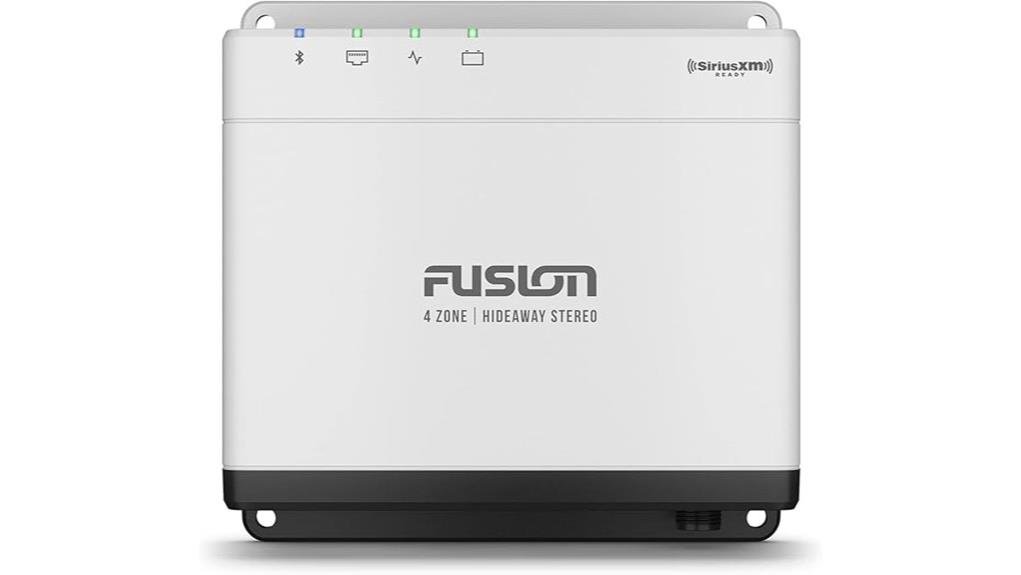
You’ll get a compact hideaway stereo that saves dash space while giving four independent DSP zones, AirPlay 2 streaming, and tight Garmin MFD integration over Ethernet. It uses waterproof connectors, supports OTA firmware via Wi‑Fi, and minimizes battery drain in standby. Per‑zone EQ, delay and crossover tuning let you match acoustics with low latency. Installation needs planned cable runs and Apollo network setup. Keep going and you’ll find setup tips, performance notes, and buying tradeoffs.
Some Key Takeaways
- Compact hideaway form factor saves dash space while using waterproof connectors for marine environments.
- Integrates tightly with Garmin MFDs via Apollo network for seamless control and zone mapping.
- Multi‑Zone DSP supports independent EQ, level, delay, and crossover tuning for up to four zones.
- Ethernet and Wi‑Fi enable AirPlay 2 streaming, OTA firmware updates, and reduced RF dropouts.
- Prioritizes battery management and minimal standby drain, but requires Apollo ecosystem for full features.
Garmin Fusion Apollo MS-WB675 at a Glance : Who It’s For and What It Does
When you need a networked marine stereo that saves dash space and integrates tightly with onboard systems, the Garmin Fusion Apollo MS‑WB675 delivers. You’ll install a compact hideaway unit designed for marine environments, then link it to Garmin MFDs and an onboard network. You’ll monitor battery management and prioritize marine safety by keeping controls off critical panels. You’ll route audio for passenger comfort across zones during coastal cruising, tailoring levels without clutter. You’ll stream via AirPlay 2 and update firmware over Wi‑Fi, keeping the system current. You’ll get a professional, integrated solution that minimizes footprint and maximizes control. This unit is ideal for recreational boaters seeking a compact, networked solution that pairs seamlessly with Garmin MFDs for expanded onboard integration.
Key Features That Matter on the Water (Hideaway Design, Multi-Zone DSP, Connectivity)
Although compact, the Apollo MS-WB675 packs features that matter at sea: a hideaway form factor that preserves dash real estate and resists marine conditions, a Multi‑Zone DSP that delivers independent, tunable audio to up to four zones, and modern connectivity (Ethernet, Wi‑Fi, AirPlay 2) for streaming, updates, and integration with Garmin MFDs and wired remotes. You’ll appreciate how the hideaway minimizes installation space while keeping waterproof connectors accessible. Multi‑Zone DSP offers per‑zone EQ and level control with minimal signal latency. Ethernet/Wi‑Fi reduce RF dropouts and OTA updates, and efficient design limits unnecessary battery drain during standby. Designed for boaters and compatible with popular marine MFDs, it complements other top marine audio solutions for your vessel, including marine stereo systems.
Real-World Setup and Integration : Installation Tips, Remotes, and Garmin MFD Pairing
For a smooth Apollo MS-WB675 setup, plan cable runs, mounting location, and network topology before you cut holes or pull wire. Route Ethernet and power separately, use marine‑grade connectors, and secure the hideaway unit away from heat or moisture. Test firmware and network links pre‑mount to avoid installation troubleshooting later. Position Fusion wired remotes where users can reach zones without blocking sightlines; verify remote placement for cable length and ingress protection. Pairing to Garmin MFDs uses the Apollo network—assign IPs, enable discovery on the MFD, then confirm zone mapping. Validate control and backup settings before finalizing mounts. Also consider placement relative to navigation lights and other onboard equipment to minimize electromagnetic interference and maintain safe visibility.
Sound Performance and Customization : Zone Tuning, Fusion DSP Profiles, Streaming Quality
After finalizing mounts and network assignments, tune the audio zones to match your boat’s acoustics and listening habits. You’ll set separate levels, delays and crossover points for up to four zones to compensate for hull reflections and speaker placements. Use Fusion DSP profiles per zone to apply EQ curves, time alignment and dynamic range control; save presets for profiles like cruising, docked or party. Measure latency measurements when streaming between devices to guarantee lip-sync and multi-zone cohesion. Verify codec support for AirPlay 2 and networked sources to maintain bitrate and avoid dropouts. The system responds predictably and is easy to iterate. For the best results on water, consider marine-specific installation tips to protect components from corrosion and moisture, such as using marine-grade hardware and proper sealing.
Verdict and Buying Advice : Pros, Cons, Alternatives, and When to Choose the MS-WB675
When you need a compact, marine-grade stereo that scales from a single-zone cockpit to a four-zone Apollo network, the MS-WB675 delivers precise, tunable sound and seamless integration with Garmin systems and AirPlay 2 streaming. You’ll appreciate compact hideaway form factor, Fusion DSP zone tuning, and Ethernet-based Apollo networking. Pros: scalable multi-zone control, Garmin/MFD integration, OTA updates, robust weatherproofing materials. Cons: higher cost than basic units, requires Apollo ecosystem for full capability, limited onboard controls. Alternatives: standalone Fusion units or multiroom marine amps from JL Audio. Choose the MS-WB675 if you prioritize integrated control, Battery management, and system scalability. For boat owners focused on onboard entertainment, choosing appropriate boat speakers and components designed for marine environments ensures longevity and performance.
Some Questions Answered
Does the MS-WB675 Include Built-In Amplifiers for All Four Zones?
Yes — the MS-WB675 provides built in amplification for all four zones. You’ll configure zone configuration within the Apollo system, assigning amplifier outputs and DSP profiles per zone. The unit’s multi-zone outputs deliver powered channels to each area, while Fusion DSP lets you tailor EQ and delay for each zone. For higher power or subwoofers you can add external amplifiers, but basic four-zone playback is amplified onboard.
Can the Unit Be Submerged or Withstand Direct Water Spray?
No, you shouldn’t submerge the unit and it isn’t rated for immersion limits; it’s designed for splash and spray resistance only. The hideaway chassis relies on a waterproof rating for ingress protection against moisture but not full underwater exposure. You’ll want to mount it in a dry, ventilated locker or enclosed helm, avoid direct prolonged spray, and follow marine installation guidelines to preserve electronics and maintain warranty compliance.
Is There a Native Android App for Wireless Control Besides Garmin MFDS?
No — there isn’t a native Android app aside from Garmin MFD integration; you’ll rely on third party apps and mobile integration via network protocols. You can control the Apollo system through compatible third party apps that support Fusion or via Apple AirPlay 2 on iOS, but Android native support is limited. For full feature access use Garmin MFDs, Fusion wired remotes, or approved third party integrations over Ethernet/Wi‑Fi.
What Power Consumption and Standby Draw Does It Have?
You’ll see modest power draw during operation and very low sleep current in standby. Typical operating current depends on load and output but ranges up to several amps at peak; idle operating draw is under 1 A. Sleep current (standby) is specified in the low tens of milliamps to preserve battery life while maintaining network presence. Plan wiring with fused 12 V supply and consider a dedicated switched circuit.
Are Firmware Updates User-Installable Without Dealer Assistance?
Yes — you can install firmware updates yourself. The firmware installation is handled over Wi‑Fi or Ethernet; you’ll download updates and apply them via the Apollo network or a connected Garmin MFD. Your user experience will be straightforward if you follow Fusion’s update prompts and keep devices networked. You’ll want stable connectivity and to avoid power loss during the process to prevent interruptions and guarantee a clean, reliable update.